Robotbase — describe your robot, world, and scenarios in YAML; compile to a running headless ROS 2 + Gazebo sim; get pass/fail evidence.
Open-core · Local-first · MIT

Give your coding agent
a robot to build and test.

Describe a robot, its world, and the behaviours to verify in YAML. Robotbase compiles that into a real, headless ROS 2 + Gazebo simulation in Docker — and hands back machine-readable pass/fail evidence.

★ Star on GitHub $ pip install robotbase-kit ⧉
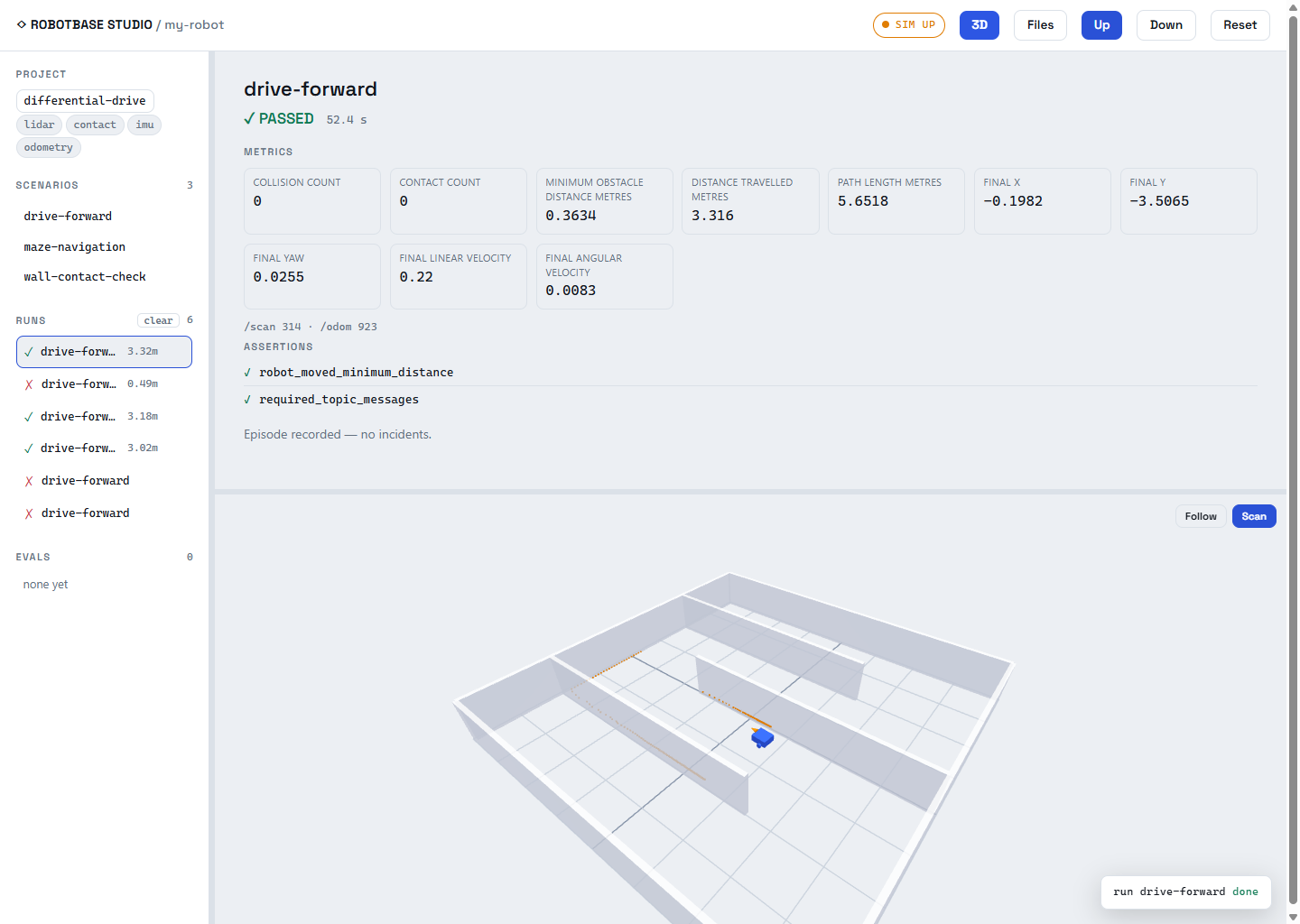
Live in Studio — the robot navigating a maze in a real headless ROS 2 + Gazebo sim, with the scenario's assertions as the test.
Four commands to evidence

From nothing to a passing scenario

No hand-written URDF, launch files, or bridges. You describe it; the compiler owns every sim gotcha.

# Linux + Docker + Python 3.12 (on Windows/macOS: WSL2 Ubuntu 24.04 + Docker Desktop)
$ pip install robotbase-kit
$ robotbase create my-bot # scaffold (differential-drive by default)
$ cd my-bot
$ robotbase up # compile specs + boot a real headless ROS 2 + Gazebo sim
$ robotbase test drive-forward
  ✔ robot_moved_minimum_distance   1.42 m  ≥ 1.0 m
  ✔ required_topic_messages /scan  37      ≥ 5
  PASSED  # exit 0 · structured result + recorded MCAP episode

Driving a coding agent instead? One command gives it the whole workflow:

/plugin marketplace add getrobotbase/robotbase
/plugin install robotbase@robotbase
> /robotbase:new navigate an S-shaped maze to the goal without touching a wall
Terraform, but for ROS 2

The layer over ROS 2 — not a replacement

Your YAML compiles down to a real, standard ROS 2 graph (nodes, topics, TF, ros2_control) on top of Gazebo. Because the runtime is genuine ROS 2, a passing scenario means something — and you can drop in your own ROS 2 code, or later a real robot, underneath the same specs.

Declarative

Not fiddly

A few lines of YAML. When the spec is wrong, you get an error that names the field — not a C++ traceback.

Structured state

Not log-scraping

describe / explain / validate hand back ground truth about the compiled robot, world, and runs — not console output to parse.

Evidence

Not vibes

A scenario is an objective pass/fail. You can't claim a robot works — you make the assertions pass.

The loop

A scenario's assertions: are the test

edit robot.yaml / world.yaml / a scenario → robotbase up → robotbase test ▲ │ └────────── read the structured result / episode ──────────┘

Define what "working" means declaratively. The assertions block is the whole test:

# simulation/scenarios/drive-forward.yaml
assertions:
  - {type: robot_moved_minimum_distance, minimum_distance_metres: 1.0}
  - {type: required_topic_messages, topic: /scan, minimum_count: 5}

Every run is metrics + assertions plus a recorded MCAP episode (Foxglove/Rerun-openable). Run it over N randomized trials with robotbase eval for a success-rate with a 95% confidence interval. Bring a Python policy instead of a ROS controller and get the same objective evidence.

Studio

A local control panel

Robotbase Studio — a local web control panel showing the robot, world, scenarios and live 3D.

pip install robotbase-kit[studio] then robotbase studio opens a localhost web app: see your robot, world, and scenarios; run a scenario or an eval and watch it live in 3D; open the episode in Foxglove; read the structured results and eval reports.

It's a thin client over the same CLI/runtime — drive it from your terminal (or a coding agent), no in-app chat, no API credits.

Start from a template — or your own URDF

Four robot archetypes, each passing a smoke test out of the box

differential-drive
Wheeled base with lidar, IMU & odometry — the default.
camera-bot
Mobile base with an RGB-D camera.
arm
Fixed-base manipulator.
drone
Quadrotor UAV.
$ robotbase create my-arm --template arm
$ robotbase create my-bot --from-urdf my_robot.urdf  # import an existing URDF verbatim
Built for agents

The tool teaches the agent how to use it

Robotbase is meant to be operated by a coding agent, so there are no external docs to keep in sync. It's CLI-first: every action is a robotbase verb with a structured (JSON) result, so any shell-capable agent drives it directly — no MCP required. robotbase schema returns the full authoring reference (generated from the code, so it can't drift). Every create drops an AGENTS.md into the project. An MCP server ships too, for MCP-only agents.

The gap it closes: a coding agent can write robot code; on its own it can't tell whether the robot actually works. Robotbase gives it the evidence.